
Getting started with Gentlii
Gentlii helps teams turn scattered product knowledge into a clear product definition, then uses that definition to validate new product ideas.
Shape the product definition
1. Start with what you already have
Start with the product information that is available today.
This can be:
- A rough idea or outline from an email thread
- Existing notes
- Stakeholder input
- Exported user feedback, for example in a Word document
- Business goals
- Company strategy or strategic goals, for example in a slide deck
- Existing product documentation
You do not need everything to be complete or consistent yet. Gentlii is meant to help you discover gaps, contradictions, and missing decisions.
2. Create the first Product Definition Set
Upload the available input into Gentlii Foundations.
Gentlii Foundations uses this input to create a first version of your Product Definition Set, including:
- Product strategy
- Business case
- Product vision
- Product charter
- Goals and success metrics
Product Guard then checks whether the generated documents are aligned with each other. This gives the organisation a starting point instead of a blank page.
3. Review with the team
Plan one or more review sessions with the people who understand the product.
Use the session to:
- Check whether the product definition is complete
- Discuss unclear or missing parts
- Review suggestions from Gentlii
- Resolve contradictions
- Agree on goals and measurements
The goal is not just to approve text but to create shared understanding.
4. Edit and version the Product Definition
Update the documents based on the reviews.
After that finalise the product definition set, so it becomes the agreed reference point for future decisions. This makes product thinking explicit instead of dependent on memory, assumptions, or individual interpretation.
5. Validate the Product Definition
After each change in the product definition set Product Guard validates the alignment between the documents.
Product Guard checks whether the strategy, vision, charter, and other definitions support each other or create conflicting direction.
Once the foundation is aligned, you can use it to validate new feature ideas.
Validate work items
1. Create an user story, task, or feature idea
Describe the work you want to validate in the backlog tool of your choice.
A useful format is:
Goal
What should this feature achieve?
Context
Why is this needed or a typical user story
Additional information
What constraints, assumptions, user needs, or business goals should be considered?
2. Feature Validation
Gentlii Feature Validation checks whether the feature aligns with the product definition set.
It looks at questions such as:
- Does this support the strategy?
- Does this fit the product vision?
- Does this respect the product charter?
- Does it contribute to agreed goals or measurements?
- Does it introduce scope drift or unnecessary complexity?
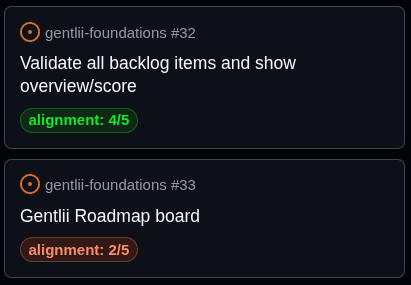
The results will be added as comment to the original work item. A label containing the alignment score will be added.
3. Improve the feature
Gentlii Feature Validation helps improving feature ideas by suggesting the smallest changes needed to make them better aligned with the Product Definition Set.
Instead of only showing what does not fit, Gentlii explains how the idea can be adjusted.
For example:
To align this feature more strongly with the goal of measurable outcomes, add a clear success metric before implementation.
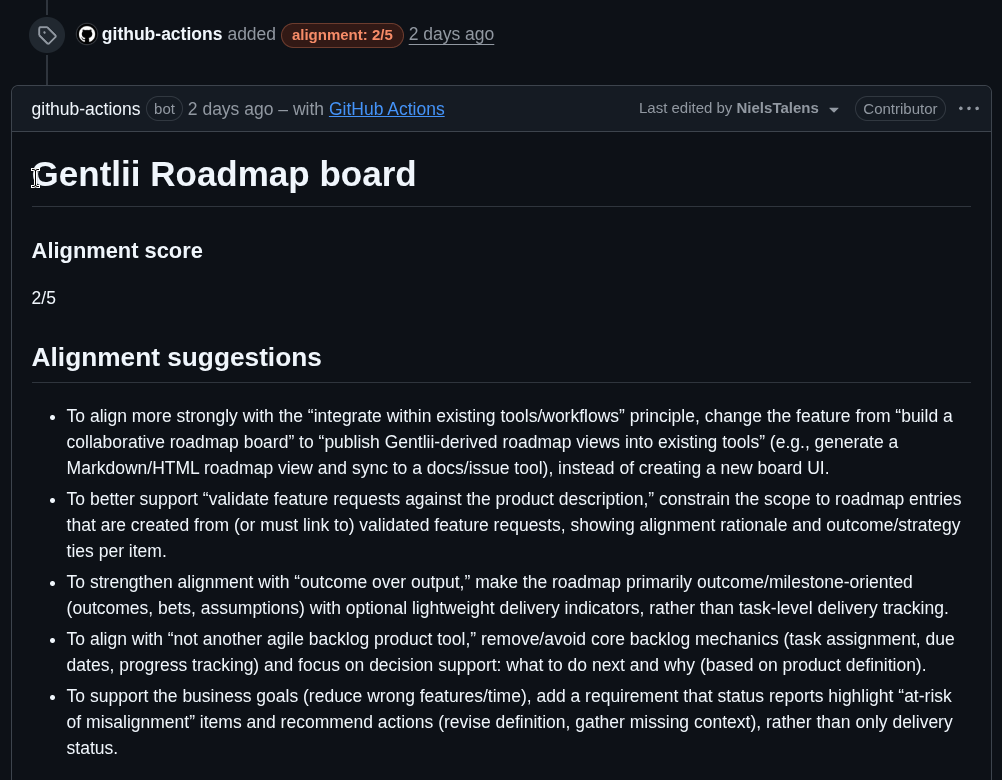
The work item will be automatically re-validated after any update.
4. Decide what to do next
Based on the validation, the team can:
- Proceed with the feature
- Adjust the feature
- Split it into a smaller version
- Reject or park it
- Update the product definition if the discussion reveals a real strategic change